Showing posts with label Software. Show all posts

Sep 26, 2011

Drivers for Huawei C5720


It is a bit busy period for me that a lot of stuffs needed to be settled for my first retail business in Yangon. Now, my shop was in progress of construction. My first retail business will be launching in mid of October. Meanwhile,I will be a bit short of time to update my blog. However, I will be trying my best to be able to update my blog as much as we can.

Many of my friends who are still in abroad are willing to know the conditions of inside Myanmar regarding to business start up. It's not an easy work as usual. First of the first, (if I were to borrow words of Robert Kiyosaki), I am now at the stage of jumping out of plane without parachute and still in progress of building my own parachute in mid air. It is a bit challenging time in my life. However, I am happy with those challenges that I choose to be. I believed that I will be able to built my own parachute before I hit the ground.

Internet connection in Yangon is better than in the past, most of the time, connection is still be able to use gtalk and skype which was more or less restricted in terms of connectivity in the past. And, EDGE connection provided in GSM network also working well. As I have written in earlier this year, internet connectivity with CDMA is working well.

As I am using CDMA connection for internet connection from time to time, I need to configure my handset in several computer that I wanted to be connected. As of I am using Huawei C5720 handset, it needs to use its drivers CD to install prior connection. Sometime,it's hard to keep the mini CD for its driver, I uploaded the whole package of drivers to 4shared for all of you. When it's needed, you can browse over and download from here.

Keep in touch, I will be updating my blog from time to time.

Download here!

May 21, 2011

Bluebeam PDF Revu 6.5

The Bluebeam PDF Revu was uploaded as per request of usual visitor of Mgluaye's page, Obama. The latest version of Bluebeam PDF is 9.2 that was released earlier this month. This uploaded version is 6.5, however I hope it should be OK for Obama and other friends of Mgluaye's page who want to experience it.

Mar 30, 2011

AutoCAD R14

This application was uploaded as per request of Ko Aye Kyaw, hoping it should be helpful to the rest of visitors of Mgluaye's pages. Below is the description of the application.

AutoCAD is a CAD software application for 2D and 3D design and publishing, developed and sold by Autodesk, Inc. Initially released in late 1982, AutoCAD was one of the first CAD programs to run on personal computers, and notably the IBM PC. Most CAD software at the time ran on graphics terminals connected to mainframe computers or mini-computers.

In earlier releases, AutoCAD used primitive entities ”such as lines, polylines, circles, arcs, and text” as the foundation for more complex objects. Since the mid-1990s, AutoCAD has supported custom objects through its C++ API. Modern AutoCAD includes a full set of basic solid modeling and 3D tools, but lacks some of the more advanced capabilities of solid modeling applications.

Download Here!

Mar 27, 2011

How To Recover Files From USB Devices Hidden By Virus

USB Show
Hi Guys! Today is one of the great days again. The reason??? I found out one software what I wanted.

Most of the time I went back homeland, I usually bring back all of my photos, software, etc with USB thumb drive, external hard drive, to be able to use for computer at my Rangoon home. Every time, I use my thumb drive, external HDD, most of the time, those USB devices were infected with viruses. When I reached back to abroad, I scanned those USB devices with Antivirus. Anti virus, malware, etc can be cleared with anti viruses. However, all of my data inside was hidden by those viruses.

Today I found a tiny software that solved my problem, called USB Show. It is not a new software, but for me, it is new as of I found out this recently only.As usual, I would like to share you all too. It is a freeware, thus you can download it from its own web portal, for those who is having difficulties to access, you can download it from here too.

Hope this tiny software help you guys to recover those precious data hidden by virus in your USB devices.

Download Here!
Credit : MyTechQuest

Mar 2, 2011

Toon Boom Studio 4.5

Following software was shared upon request of Mornrazagree who is the usual visitor of Mgluaye's Pages. Toon Boom is the one of the animation software that you can create animation such as cartoon movie as well.

Here is the description of the software:


All-In-One Animation Software
 
Toon Boom Studio 4.5 is ideal for individuals looking for an all-in-one animation software. From drawing digitally, scanning hand-drawn animations or seamlessly importing existing artwork, Studio 4.5 enables you to lip sync your animation, setup the action in a 3D space and publish your animation projects for print, TV, HDTV, the Web, YouTube and iPod! Covering the entire animation workflow from sketching to final publishing, you will find Toon Boom Studio to be a great tool to create or learn animation.


Create
Developed by animators for animators, Toon Boom Studio offers intuitive and easy-to-use drawing tools. In addition to onion skinning, automatic gap-closing and a full screen rotary light table, Studio 4.5 can import a wide range of media to create live-action cartoons and rotoscoping.


Animate
Toon Boom Studio offers true animation features designed to facilitate the creation of any styles of animation, including traditional frame-by-frame animation, keyframe animation, cut-out, photo animation and live-action cartoon.

Publish
In addition to printing, Toon Boom Studio creates high quality animation for any media including the web, iPod, YouTube, cell phones and PDAs, TV and HDTV. Studio 4.5 supports all major industry standards including SWF, QuickTime, AVI, DV, and image sequences.

Download Here!

Feb 27, 2011

Wondershare Photo Recovery

In previous December 2010, my beloved grand mom has passed away. My family from Rangoon flown back to hometown in northern part of Arakan and had done up her funeral services. As of I were on abroad, I were unable to attend my grand mom's funeral, thus I asked my family to take photos of the event. My family has done as I requested. After funeral services, there was good deeds offering for my late grand mom. Several hundreds photos were shot.

Unfortunately, one day after funeral service, one of my cousins, small boy, took my camera and played with it and accidentally deleted all the photos inside SD cards. All the photos were gone. My Mom cried sadly one day long as of those photos were the last foot prints of her mother on earth. She didn't let me know as of she worried I would felt shock after hearing that sad news. But, my younger brother informed me about it while we had conversation on the phone. I also felt sad at first, however what should I do? Worrying and feeling sad cannot bring back the deleted photos. Thus, I decided to find out is there a way to recover back these deleted photos.

If there is a will, there is a way. As usual, I am looking at Google search engine. In the meanwhile, I called to my younger brother to keep that affected SD card unused, tell him not to take any more photos. I found software called Wondershare Photo Recovery and finally I could retrieve back all the deleted photos. Then, I decided to share the software for all of my blog visitors for all of your goodness. You can download the software over here. You can install it as in trial version. To be able to get the software to be activated, please download this small file over here and use that information to activate your software.

Hope you all can use it whenever you need it.

Feb 20, 2011

Activation of AutoCAD 2010

Actually, AutoCAD 2011 has been released too, but for us, AutoCAD 2008 is still good enough for general purpose drawing reviewing and sketching as per on site requirement. However, for those who would like to experience better performance of AutoCAD 2010, this post will help you to be able to get your AutoCAD 2010 to be activated.

The steps that needed to do is described inside the file that zipped together with the dll file that needed to replace in the same folder your AutoCAD 2010 was installed.

Enjoy here!

Jun 25, 2010

Rapidshare Auto Downloader 4.0

Before I am trying this software, it was quite troublesome for me to download files hosted on rapidshare because free users  are allowed very few and limited downloads from it.

So, I tried to find out  software that I can download rapidshare files without facing those difficulties. I found this software called Rapidshare Auto Downloader. You may need to add the rapidshare links to that program and it will try to download behalf of you. You don’t need to do anything; that software will try again and again and again until the files downloaded.

Here are some key features of "Rapidshare Auto Downloader":

• Download a group of links from rapidshare (one by one).
• Download incomplete downloads until all links are downloaded.
• Auto shutdown feature
• Load and save the download list.
• Check for new versions automatically.
• Support of 3 Languages: English, Farsi, French

Download here!
ifile, Google

May 23, 2010

MP3 Cutter 1.5 (Freeware)

One of Mgluaye's Pages' visitors, Obama requested to upload mp3 trimmer. So that, I'd uploaded this upon his request. Software called MP3 Cutter 1.5 is a freeware, you can download from its original website here also.

Its file size is about 7 MB, so we can say that a tiny software, you may need to select the interval that you want to cut.

Download here!

May 10, 2010

Gtalk Always Idle

Actually, I had posted about Gtalk Always Idle before, here. But, when I double check the link I referred (its original site), the link was dead and the download link is no longer working already. I found that some of my friends who visited MGLUAYE'S PAGES are looking for Gtalk Always Idle. Thus, I uploaded the same software to different server. I hope it will help you to play with your friends by pretending to be idle whenever you want.

Now you can download it over here.

Hope you all enjoy.
------------------------------------------------
This post was posted on 2010. Jan. 19th. It was re-posted in 2010. May . 10 after updating the broken link.
------------------------------------------------

Jan 7, 2010

Learn Chinese 2007 V5.11

Learn Chinese 2007 V5.11
Learn Chinese 2007 is a learning utility for Chinese vocabulary. Its working is based on personalized lists in order to follow tightly the needs and progress of the user.

This software is addressed to all people eager to learn Chinese and in particular to progress quickly in the assimilation of the vocabulary. It is adapted as a support for a collective course (all level scholar courses) or individual (particular course, self-training).

Features:

  • A full-features character writing database : see character writing animation, practice writing hanzi, the program will evaluate the quality of your writing.

  • A flexible word-list system Create your own word-lists very easily within our 400-characters selection or you can choose words from the Chinese dictionary itself. This selection of 400 characters represents 70% of the characters you can find in books and newspapers.

  • A comprehensive Chinese-English Dictionary including more than 16,000 characters, both traditional and simplified.

  • Learn... Fast ! A set of quizzes to assimilate your word-lists very fast. With Learn Chinese 2006 it has never been so easy to memorize chinese characters. Character Grid-search, Translation Multichoice, and Pronunciation exercise will help you progressing astonishingly fast !

  • Make sure your pronunciation is perfect ! Learn Chinese 2006 comes with a database of character pronunciation. Just double-click on any word and listen to the right pronunciation!

Download Here!

Cboxမွာ ေတာင္းဆိုလာတဲ႕ pyestar ရဲ႕ ေတာင္းဆိုမႈ အတြက္ပါ။ ေလာေလာဆယ္ ႐ွာလို႕ရတဲ႕ 2007 Version ကို အယင္ တင္ေပးလိုက္ပါတယ္။ ေနာက္မ်ားမွ သူ႕ထက္ ပို အဆင္႕ျမင္႕တဲ႕ Version မ်ား Download လုပ္လို႕ ရခဲ႕ရင္လည္း ထပ္ တင္ေပး ပါဦးမယ္။ ေမာင္လူေအးေတာ႕ စမ္း မသံုးၾကည္႕ရေသးပါဘူး။ စမ္းသံုးၾကည္႕ၾကပါဦးဗ်ာ။

May 22, 2009

Portable Office 2003 Pro SP3 (USB edition)

အေရးေပၚ ခဏသံုးတဲ႕ စက္ထဲမွာ Microsoft Office မ႐ွိလို႕ အခက္အခဲ ျဖစ္တာမ်ိဳး ျဖစ္ဖူးၾကမယ္ ထင္တယ္။ ေနာက္တစ္ခါ တစံုတေယာက္က ေပးလိုက္တဲ႕ File က 2007 ဗား႐ွင္း (*.docx) ျဖစ္ေနလို႕ ဖြင္႕မရတာမ်ိဳး ျဖစ္ေနတာမ်ိဳး ျဖစ္ဖူးၾကမယ္ ထင္ပါတယ္။ လိုမ်ိဳး… လိုမ်ိဳးေတြကို… (ထက္ထက္မိုးဦး အသံႏွင္႕ ဖတ္ပါ… :P) အစစ အဆင္ေျပေစဖို႕ လက္ထဲ ကိုင္ေဆာင္ သြားေနက် မွတ္ဥာဏ္ေခ်ာင္း ထဲ ထည္႕ၿပီး သယ္သြားလို႕ ရတဲ႕၊ Install လုပ္စရာ မလိုတဲ႕ Microsoft Office SP3 Portable (USB Version) ေလး ျဖစ္ပါတယ္။ File Size က စုစုေပါင္း Mega Byte 130 ေက်ာ္ ေလးပဲ ႐ွိတဲ႕ အတြက္ သြားေလရာ အလြယ္တကူ ထည္႕သြားလို႕ ရတယ္ေလ။

သြားေလရာ အလြယ္တကူ သယ္သြားလို႕ ရေပမဲ႕လို႕ File Share ဖို႕ File Hosting ထဲ တင္တဲ႕ခါက်ေတာ႕ ဖြက္ကလိ ဒဂၤါး ေပးမထားတဲ႕ Hosting ဆိုေလေတာ႕ Mega Byte ၁၃၀ေက်ာ္ကို တစ္ဖိုင္တည္း တင္လို႕ မလြယ္တာ အခက္အခဲ ျဖစ္ပါတယ္။ အဲဒီေတာ႕ အားလံုးလည္း Download လုပ္လို႕ လြယ္ေစမဲ႕ Mega Byte 50 ဖိုင္ 2 ဖိုင္ နဲ႕ 30 ေက်ာ္ တစ္ဖိုင္ ခြဲၿပီး တင္ေပးလိုက္ပါတယ္။

Software ကို Run ႏိုင္ဖို႕ File 3 File လံုးကို Download ဆြဲ Zip ေျဖဖို႕ လိုပါမယ္ File 3 File ကို Download လုပ္၊ Folder ေလးတစ္ခုထဲ ထည္႕ပါ။ ၿပီးရင္ Zip File ကို ေျဖပါ။ ရလာတဲ႕ Folder ေလးကို သြားေလရာ… သူငယ္ခ်င္းရဲ႕ မွတ္ဥာဏ္ေခ်ာင္းထဲ ထည္႕သာ သယ္သြားပါေတာ႕ဗ်ာ…

ေအာက္မွာေတာ႕ ၿဗိတိသွ်လို ဖတ္ခ်င္တဲ႕ သူငယ္ခ်င္းမ်ား အတြက္ ၿဗိတိသွ်လို ေရးထားတာေလး ထပ္တြဲ ေပးလိုက္ပါတယ္။

အဆင္ေျပ ေခ်ာေမြ႕မႈ ႐ွိမယ္ ေမွ်ာ္လင္႕ပါေၾကာင္း…


Carry a microsoft office in your usb stick and run it on every pc. A Click and Run version of MS office 2003 containing the last main update package,SP3. Besides, File Format Converters were added too. With this extension, office 2003 gains the ability to open Office 2007 documents.

Portable office contains:
Word
Excel
PowerPoint
office Document Imaging
Picture Manager
Clip Organizer

Microsoft Office 2003 (Professional Edition) represents a major upgrade to previous versions of the world's most popular suite of software applications. Office 2003 includes new and familiar products, features, and functionality that can help organizations and their employees connect to coworkers, information, and business processes quickly and effectively.

Advances in intranet collaboration through integration with the collaboration and information-sharing portal, Microsoft Office SharePoint Portal Server 2003, enable employees to access and share information both internally and externally. Support for information rights management (IRM) and industry-standard Extensible Markup Language (XML) provide a platform on which to quickly build cost-effective solutions that can have an immediate impact in your business and productivity.

Download Part One
Download Part Two
Download Part Three

May 16, 2009

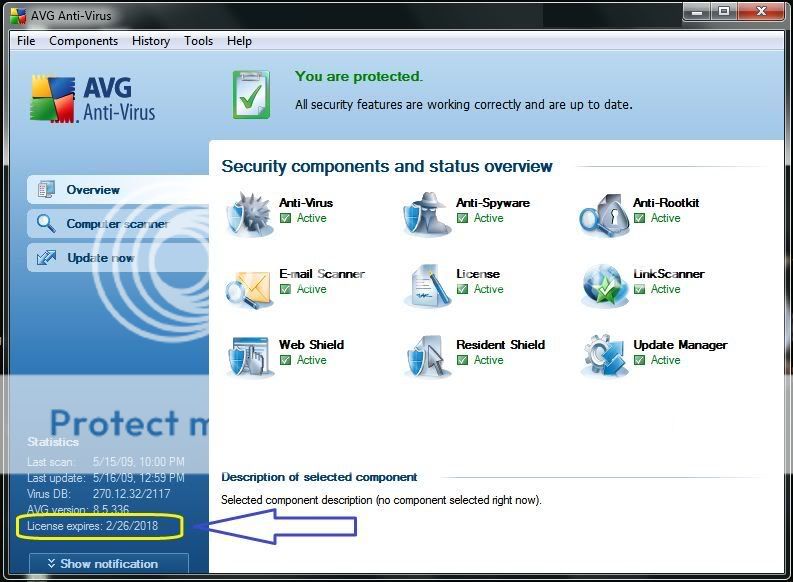
License Serial for AVG 8.5

AVG logoAVG 8.5 ရဲ႕ ကိုးႏွစ္တိတိ အခမဲ႕ သံုးလို႕ရမဲ႕ Serial ေလး ေ၀မွ် ပါမယ္။ AVG 8.5 Free Version ကို ဒီေနရာမွာ Download လုပ္ပါ။ ၿပီးရင္ Install လုပ္ပါ။ License သက္တမ္းတစ္ခု ေပးပါလိမ္႕မယ္။

Software ကို Run ပါ။ Main Windows ရဲ႕ Help ထဲက Activate ကို သြားပါ။

License Serial ကို ရဖို႕ ဒီေနရာမွာ Download လုပ္ပါ။ Download လုပ္ထားတဲ႕ Text File မွာပါတဲ႕ လိုင္စင္ Serial ၃ ခုထဲက ႀကိဳက္ႏွစ္သက္ရာ တစ္ခုခုကို လိုင္စင္ Serial နံပတ္ ထည္႕တဲ႕ အကြက္ေလးထဲ ထည္႕ေပးပါ။ ၿပီးရင္ Activate ေပါ႕ဗ်ာ။

Free Version ကေနၿပီး လိုင္စင္သက္တမ္း ၉ ႏွစ္ေက်ာ္(2018 February 26) အခမဲ႕ သံုးလို႕ရတဲ႕ Licensed Version အျဖစ္ကို ပလံုေတာင္ မျမည္ဘဲ ေရာက္႐ွိ၊ ရ႐ွိသြားမွာ ျဖစ္ပါေၾကာင္း။

ထပ္မံျဖည္႕စြက္ခ်က္...
AVG Free Version နဲ႕ Activate ကို ႐ွာမေတြ႕ဘူးဆိုသူမ်ားအတြက္ AVG Paid Version ထပ္တင္ေပးထားပါတယ္။ ဒီမွာ Download လုပ္ပါ။

Part 1 | Part 2 | Part 3 | Part 4

Apr 27, 2009

Able2Extract Professional 5.0


Solid PDF Document နဲ႕ Scanned PDF ေတြကို Words အေနနဲ႕ ေျပာင္းတာေတာ႕ အေတာ္ေလး အဆင္ေျပ ၾကပါတယ္။ သို႕ေပမဲ႕ Words တစ္ခုတည္းပဲ ေျပာင္းလို႕ရပီးေတာ႕ Excel ကိုလည္း ေျပာင္းခ်င္ပါတယ္ ဆိုတဲ႕ ပရိသတ္မ်ား အတြက္...

Able2Extract နဲ႕ Solid PDF Document ရဲ႕ ကြာျခားခ်က္က Solid PDF က Accuracy ပိုေကာင္းတာ ေတြ႕ရၿပီး Able2Extract က အနည္းငယ္ တိက်မႈ အားနည္းတာ ေတြ႕ရပါတယ္။ စမ္းသပ္ သံုးစြဲ ၾကည္႕လိုသူမ်ား အတြက္ Software ကို ဒီေနရာမွာ Download လုပ္ပါ။ Crack ကို ဒီေနရာမွာ Download လုပ္ပါ။

အစစ အရာရာ အဆင္ေျပ ၾကပါေစဗ်ာ။

Apr 15, 2009

Solid Converter PDF 5.0.627

PDF Creator တစ္ခုခုနဲ႕ Virtually Print ထားတဲ႕ PDF File ေတြကို Words အေနနဲ႕ ျပန္ေျပာင္းတာ အေတာ္မ်ားမ်ား အဆက္ေျပေျပနဲ႕ ေျပာင္းႏိုင္ ၾကပါတယ္။ သို႕ေပမဲ႕ Scanner နဲ႕ Scan ဖတ္ထားတဲ႕ Jpeg Format စာသားေတြ က်ေတာ႕ Words အေနနဲ႕ ျပန္ေျပာင္းဖို႕ တစ္ခါတစ္ခါ အင္မတန္ အခက္အခဲ ျဖစ္ပါတယ္။ ေျပာင္းလို႕ရတဲ႕ Freeware ေတြက်ေတာ႕လည္း စာမ်က္ႏွာ အကန္႕အသတ္ ႐ွိေနျပန္ေရာ…


အဲဒီ အခက္အခဲေလးေတြကို ေျပလည္ႏိုင္ဖို႕ ဒီတစ္ခါ ေ၀မွ်ခ်င္တဲ႕ Software ေလးက Solid Document PDF လို႕ေခၚတဲ႕ Software ေလးပါ။ ဘာနဲ႕ပဲ လာလာ PDF မွန္သမွ် Text ကို Text အေနနဲ႕ Image ေတြကို Jpg အေနနဲ႕ တခါတည္း ေျပာင္းဖတ္ေပးတဲ႕ Software ေလး ျဖစ္ပါတယ္။

Software ေလး ရႏိုင္ေစဖို႕ ဒီမွာ Download လုပ္ပါ။

Download လုပ္ထားတဲ႕ Winrar ဖိုင္ကို ဖြင္႕ပါ။ ဖြင္႕လိုက္တဲ႕ Winrar ကို ဒီလို ျမင္ရပါမယ္။

အဲဒီအထဲက solidconvertpdfv5.exe ကို Run လုိက္ပါ။ Software ကို Install လုပ္ေပးပါလိမ္႕မယ္။ Install လုပ္ပီးတဲ႕ေနာက္ ခုနက Winrar ဖိုင္ထဲက Crack ဆိုတဲ႕ ဖိုင္ေလးကို ထပ္ဖြင္႕ပါ။ အဲဒီခါ ခုလို ထပ္ေတြ႕ရပါမယ္။

အဲဒီထဲက Solid Converter PDF v5.0.672_Patch.exe ဆိုတဲ႕ ဖိုင္ေလးကို Run ပါ။ ခုလို ထပ္ျမင္ရပါမယ္။


အဲဒီပံုေလးရဲ႕ ထိပ္နားက Crack It ဆိုတာကို ႏွိပ္ပါ။ သူက Patch လုပ္ဖို႕ ဖိုင္ေတာင္းပါလိမ္႕မယ္။ Software ကို Drive C ထဲမွာ Install လုပ္ထားတာ ဆိုခဲ႕ရင္

C: >> Program File >> SolidDocuments >> Solid Converter PDF >> SCPDFV5 >> ConverterCore.dll

ဒီေနရာမွာ ConverterCore.dll ဆိုတဲ႕ ဖိုင္ေလး ႐ွိေနပါလိမ္႕မယ္။ Install လုပ္တာ Drive C မဟုတ္တဲ႕ တျခား Drive ဆိုေတာ႕လည္း C: ဆိုတဲ႕ေနရာမွာ တျခား Drive ကို သြား႐ွာဖို႕ လိုပါမယ္။ ဖိုင္ေလးကို Select လုပ္ Open ခလုတ္ေလးကို Click တစ္ခ်က္ ႏွိပ္လိုက္တဲ႕ ေနာက္မွာ…

PDF မွန္သမွ် အကုန္ သမလို႕ ရတဲ႕ Software Full Version ေလးကို ရ႐ွိပါလိမ္႕မယ္ဗ်ာ။

Download Here!

Dec 24, 2008

Foxit PDF Editor

AutoCAD သမားေတြ အတြက္ေရာ၊ ေဆာက္လုပ္ေရး လုပ္ငန္းခြင္နဲ႕ ဆက္ႏြယ္ေနတဲ႕ အင္ဂ်င္နီယာမ်ား၊ ကြန္ပ်ဴတာ အသံုးျပဳသူမ်ား အတြက္ ေနာက္ထပ္ PDF နဲ႕ ဆိုင္တဲ႕ Software တစ္ခုပါ။ Foxit PDF Editor လို႕ ေခၚပါတယ္။ Download ကို ဒီမွာလုပ္ပါ။ ၿပီးရင္ Install လုပ္ပါ။ Install လုပ္ၿပီးတဲ႕ ဖိုင္ကို ဖြင္႕တဲ႕ခါက်ရင္ Registry Key ေတာင္းပါလိမ္႕မယ္။ Key မထည္႕ဘဲနဲ႕လည္း Evaluation နဲ႕ကို တစ္ႏွစ္တိတိ Free ေပးသံုးပါတယ္။ အဲဒီ Free Version နဲ႕ Register Version ရဲ႕ ကြာဟခ်က္ကေတာ႕ Save လုပ္တဲ႕ အခ်ိန္မွာ Foxit က သူတို႕ ကုမၸဏီေၾကာ္ျငာေလးကို ထည္႕ေပး တတ္တာပါပဲ။

Foxit

အဲလိုမွ မဟုတ္ဘူး။ အျပည္႕ပဲ သံုးခ်င္ပါတယ္ဆိုရင္ေတာ႕လည္း ဒီဖိုင္ေလးကို Download လုပ္ၿပီး ေနာက္တစ္ေခါက္ Program Run တဲ႕အခ်ိန္၊ Key ေတာင္းတဲ႕ အခ်ိန္မွာ အဲဒီဖိုင္ထဲ ပါသမွ် စာကို ကူးသာ ထည္႕လိုက္ေပေတာ႕။ အံုဖြ… အကုန္ရ ဆိုသလို…. ပလံု ကနဲေတာင္ မျမည္ဘဲနဲ႕ အလိုေလ်ာက္ ေရစစၥႀကီ ဗားရွင္းႀကီး ျဖစ္သြားပါေရာဗ်ာ… :)

Nov 4, 2008

AutoCAD MEP 2009 Download Links

Autodesk MEP v2009 2DVD | 7.3 GB
AutoCAD MEP is the AutoCAD software - based building design and construction documentation application for Mechanical, Electrical, and Plumbing (MEP) engineers, designers, and drafters that helps improve productivity, accuracy, and coordination.


AutoCAD.MEP.V2009_Part.01.rar
AutoCAD.MEP.V2009_Part.02.rar
AutoCAD.MEP.V2009_Part.03.rar
AutoCAD.MEP.V2009_Part.04.rar
AutoCAD.MEP.V2009_Part.05.rar

AutoCAD.MEP.V2009_Part.06.rar
AutoCAD.MEP.V2009_Part.07.rar
AutoCAD.MEP.V2009_Part.08.rar
AutoCAD.MEP.V2009_Part.09.rar
AutoCAD.MEP.V2009_Part.10.rar

AutoCAD.MEP.V2009_Part.11.rar
AutoCAD.MEP.V2009_Part.12.rar
AutoCAD.MEP.V2009_Part.13.rar
AutoCAD.MEP.V2009_Part.14.rar
AutoCAD.MEP.V2009_Part.15.rar

AutoCAD.MEP.V2009_Part.16.rar
AutoCAD.MEP.V2009_Part.17.rar
AutoCAD.MEP.V2009_Part.18.rar
AutoCAD.MEP.V2009_Part.19.rar
AutoCAD.MEP.V2009_Part.20.rar

AutoCAD.MEP.V2009_Part.21.rar
AutoCAD.MEP.V2009_Part.22.rar
AutoCAD.MEP.V2009_Part.23.rar
AutoCAD.MEP.V2009_Part.24.rar
AutoCAD.MEP.V2009_Part.25.rar

AutoCAD.MEP.V2009_Part.26.rar
AutoCAD.MEP.V2009_Part.27.rar
AutoCAD.MEP.V2009_Part.28.rar
AutoCAD.MEP.V2009_Part.29.rar
AutoCAD.MEP.V2009_Part.30.rar

AutoCAD.MEP.V2009_Part.31.rar
AutoCAD.MEP.V2009_Part.32.rar
AutoCAD.MEP.V2009_Part.33.rar
AutoCAD.MEP.V2009_Part.34.rar
AutoCAD.MEP.V2009_Part.35.rar

AutoCAD.MEP.V2009_Part.36.rar
AutoCAD.MEP.V2009_Part.37.rar
AutoCAD.MEP.V2009_Part.38.rar
AutoCAD.MEP.V2009_Part.39.rar
AutoCAD.MEP.V2009_Part.40.rar


AutoCAD.MEP.V2009_Part.41.rar
AutoCAD.MEP.V2009_Part.42.rar
AutoCAD.MEP.V2009_Part.43.rar
AutoCAD.MEP.V2009_Part.44.rar
AutoCAD.MEP.V2009_Part.45.rar

AutoCAD.MEP.V2009_Part.46.rar
AutoCAD.MEP.V2009_Part.47.rar
AutoCAD.MEP.V2009_Part.48.rar
AutoCAD.MEP.V2009_Part.49.rar
AutoCAD.MEP.V2009_Part.50.rar

AutoCAD.MEP.V2009_Part.51.rar
AutoCAD.MEP.V2009_Part.52.rar
AutoCAD.MEP.V2009_Part.53.rar
AutoCAD.MEP.V2009_Part.54.rar
AutoCAD.MEP.V2009_Part.55.rar

AutoCAD.MEP.V2009_Part.56.rar
AutoCAD.MEP.V2009_Part.57.rar
AutoCAD.MEP.V2009_Part.58.rar
AutoCAD.MEP.V2009_Part.59.rar
AutoCAD.MEP.V2009_Part.60.rar

AutoCAD.MEP.V2009_Part.61.rar
AutoCAD.MEP.V2009_Part.62.rar
AutoCAD.MEP.V2009_Part.63.rar
AutoCAD.MEP.V2009_Part.64.rar
AutoCAD.MEP.V2009_Part.65.rar

AutoCAD.MEP.V2009_Part.66.rar
AutoCAD.MEP.V2009_Part.67.rar
AutoCAD.MEP.V2009_Part.68.rar
AutoCAD.MEP.V2009_Part.69.rar
AutoCAD.MEP.V2009_Part.70.rar

AutoCAD.MEP.V2009_Part.71.rar
AutoCAD.MEP.V2009_Part.72.rar
AutoCAD.MEP.V2009_Part.73.rar


Password : freshwap.net
Size : 7.3 GB

Oct 20, 2008

AutoCAD Electrical 2009

ၿပီးခဲ႕တဲ႕ ေသာၾကာေန႕က AutoCAD Electrical 2009 မိတ္ဆက္ Seminar တစ္ခုသြားတက္ရပါတယ္။ AutoCad Electrical 2009 တရား၀င္ ျဖန္႕ခ်ီခြင္႕ယူထားတဲ႕ INNOCOM TECHNOLOGIES PTE LTD ကေနေပးတဲ႕ Product Introduction Seminar ေလးပါ။ AutoCAD သံုးေနတဲ႕ ကုမၸဏီေတြအတြက္ သူတို႕က ဖိတ္ေခၚၿပီး တက္ေရာက္ခိုင္းတဲ႕ အခမဲ႕ Seminar ပါ။

AutoCAD 2009 နဲ႕ AutoCAD Electrical 2009 ဘာကြာလဲ ဆိုေတာ႕ Electrical အတြက္ အထူးျပဳထားတဲ႕ Features ေတြ ေတာ္ေတာ္မ်ားမ်ား ထည္႕ထားတာ ေတြ႕ရပါတယ္။


၁. ပိုမို ႐ွင္းလင္း လြယ္ကူတဲ႕ Symbol Libraries ပါ႐ွိျခင္း။

အယင္ AutoCAD မွာပါတဲ႕ Design Center အျပင္ Electrical အတြက္ အထူးျပဳထားတဲ႕ Components ေတြပါ ထည္႕သြင္းထားတဲ႕ ပိုမို ျပည္႕စံုရွင္းလင္း လြယ္ကူတဲ႕ Symbol Libraries ပါရွိပါတယ္။ Electrical Eomponents ေတြကို အယင္ AutoCAD မွာ ဆြဲတဲ႕ခါ ဆြဲထားတဲ႕ Wire အေနနဲ႕ သံုးထားတဲ႕ Line ကို AutoCAD ႐ိုး႐ိုးက Wire လို႕နားမလည္တဲ႕ အတြက္ အကယ္၍မ်ား Component ကို ေနရာ ေရႊ႕ခ်င္တယ္ဆိုရင္ Component ရဲ႕ မူလေနရာ Line ေပၚမွာ က်န္ခဲ႕တဲ႕ Gap ကို ျပန္ Join ေပးဖို႕ လိုအပ္ပါတယ္။ ၿပီးေတာ႕ ေနာက္ ေနရာသစ္မွာလည္း သက္ဆိုင္ရာ Component ရဲ႕ ေနရာမွာ မလိုတဲ႕ Component ေနရာက Line ကို Trim တစ္ခါ ထပ္လုပ္ေပးရဦးမွာ ျဖစ္ပါတယ္။

အခု AutoCAD Electrical 2009 ကေတာ႕ အဲဒီ ထပ္ဖန္တလဲလဲ လုပ္ရမဲ႕ အလုပ္ေတြကို လုပ္ေဆာင္စရာ မလိုေတာ႕ပါဘူး။ မိမိ ဆြဲတဲ႕ Line ကုိ Wire အေနနဲ႕ သတ္မွတ္ေပးထားလိုက္ၿပီးရင္ သူက Component လာ ေနရာခ်တာနဲ႕ တၿပိဳင္နက္ မလိုတဲ႕ Wire ေနရာေတြကို အလိုေလ်ာက္ Trim လုပ္ေပးၿပီးသား ျဖစ္သြားပါတယ္။ အကယ္၍ ေနရာေ႐ႊ႕ခဲ႕ရင္လည္း ကိုယ္ထားခ်င္တဲ႕ ေနရာကို ထားခ်င္တဲ႕ Component ကို Drag လုပ္သြားလိုက္တာနဲ႕ Gap ပါ တပါတည္း လိုက္ေ႐ြ႕ၿပီးသား ျဖစ္သြားပါတယ္။

ဆြဲသြားတဲ႕ Wires ေတြ အခ်င္းခ်င္း ျဖတ္သြားေက်ာ္သြားတာ ရွိမယ္ဆိုခဲ႕ရင္ အလိုေလ်ာက္ Jumper ေလး ထည္႕ေပးၿပီး အဆံုးသတ္ termination ေတြအတြက္လည္း Solder End ပံုစံေလး အလိုေလ်ာက္ ထည္႕ေပးပါတယ္။

၂. အလိုေလ်ာက္ Wire နံပတ္စဥ္တပ္ျခင္း၊ Component အမည္တပ္ျခင္း လုပ္ေဆာင္ႏိုင္ျခင္း။

ေရးဆြဲထားတဲ႕ Electrical Circuit ေတြမွာ Wire ဘယ္ႏွစ္ေခ်ာင္းပါတယ္။ ဘယ္ Wire က ဘယ္ Component ဆီသြားၿပီး ဘယ္ Wire က ဘယ္ Junction Box မွာ ဆံုးတယ္ဆိုတာက အစ နံပတ္စဥ္ အလိုေလ်ာက္ တပ္ေပးပါတယ္။ Component အမည္တပ္တဲ႕ ေနရာမွာလည္း ထုတ္လုပ္တဲ႕ Company၊ Model၊ Ampere Rating အဆံုး သူ႕အလိုေလ်ာက္ တပ္ခိုင္းႏိုင္သလို စာရင္းထဲမပါတဲ႕ အမည္နာမမ်ားအတြက္လည္း အလြယ္တကူ မိမိဘာသာ ျပင္ဆင္ တပ္ေပးႏိုင္ပါတယ္။

၃. အလိုေလ်ာက္ Project Report ထုတ္ေပးႏိုင္ျခင္း။

အလိုေလ်ာက္ Project Report အလိုေလ်ာက္ထုတ္ေပးႏိုင္တယ္ဆိုတဲ႕ Feature က အလြန္အက်ိဳးရွိတဲ႕ Feature တစ္ခုပါ။ Project Tendering Stage မွာ အလြန္အလုပ္႐ႈပ္တဲ႕ Point Counting လုပ္ရတဲ႕ Quantity Surveyor (Q.S)မ်ား အတြက္ အလြန္ အသံုး၀င္သလို Project Running Stage မွာလည္း အလြန္အသံုး၀င္ပါတယ္။ ႀကီးမားလွတဲ႕ Drawing ထဲ ဘယ္အမ်ိဳးအစားပစၥည္း ဘယ္ႏွစ္ခု ရွိေနသလဲဆိုတာ Count ရတာ အေတာ္ေလး လက္၀င္တဲ႕ ကိစၥပါ။ အဲဒီအတြက္ အလိုေလ်ာက္ Project Report ထုတ္ေပးႏိုင္တဲ႕ Function ကေတာ႕ အလြန္တရာမွ လ်င္ျမန္ပါတယ္။ ရလာတဲ႕ ရလာဒ္ကို Spreadsheet အေနနဲ႕ ဖိုင္ သတ္သတ္ Save ႏိုင္သလို၊ Drawing ေပၚမွာလည္း Paste လုပ္ႏိုင္ပါတယ္။

၄. အခ်ိန္နဲ႔ တေျပးတည္း Error Checking လုပ္ေပးႏိုင္ျခင္း။

အထူးသျဖင္႕ PLC သမားေတြအတြက္ ပိုၿပီး အသံုးတည္႕မယ္ ထင္ပါတယ္။ System ႀကီးတစ္ခုလံုးအတြက္ ဘယ္ေနရာမွာ Wire Connection ျပတ္က်န္ေနခဲ႕တယ္၊ မဆက္မိဘဲ က်န္ေနတယ္ဆိုတာကို အခ်ိန္နဲ႕ တေျပးတည္း Error Checking လုပ္ေပးႏိုင္ပါတယ္။

၅. အခ်ိန္နဲ႕ တေျပးတည္း ကြိဳင္ႏွင္႕ Contact Cross-Referencing လုပ္ေပးႏိုင္ျခင္း။

အမွတ္စဥ္ (၄) နဲ႕ ပိုဆင္ပါတယ္။ Electrical Switching Board ေတြအတြက္ Contact Referencing အခ်ိန္နဲ႕ တေျပးညီ လုပ္ေပးႏိုင္ပါတယ္။

၆. တိက်ေသသပ္တဲ႕ Panel Layout Drawing မ်ား ေရးဆြဲႏိုင္ျခင္း။

Switching Board Installation မ်ားအတြက္ Panel Layout Drawing မ်ား ပိုမိုလွပ ေသသပ္စြာ ေရးဆြဲႏိုင္ပါတယ္။

၇. Electrical Specialized Features မ်ား ပါရွိျခင္း။

AutoCAD Electrical 2009 ျဖစ္တဲ႕အတြက္ Electrical Specilized Features ေတြ ပါ၀င္တာ ကေတာ႕ ေျပာစရာ မလုိေအာင္ပါပဲ။

၈. Spreadsheet ေတြထဲပါတဲ႕ Data ေတြကို အသံုးခ်ၿပီး PLC I/O Drawing မ်ား အလိုေလ်ာက္ထုတ္ေပးႏိုင္ျခင္း။

ဒါသည္လည္းပဲ အယင္ AutoCAD ေတြမွာ မပါတဲ႕ Feature တစ္ခုပါပဲ။ PLC အဓိက လုပ္ရတဲ႕ ကုမၸဏီေတြမွာ အလုပ္လုပ္ေနၾကတဲ႕ AutoCAD သမားေတြ အတြက္ေတာ႕ မ႐ွိမျဖစ္ေပါ႕။

၉. Customers မ်ား၊ Supplier မ်ားနဲ႕ Drawing ေတြကို Share လုပ္သံုးႏိုင္ၿပီး၊ သူတို႕ရဲ႕ ေျပာင္းလဲမႈကို အစဥ္ ေစာင္႕ၾကည္႕ႏိုင္ျခင္း။

ခဏခဏ ေျပာင္းတတ္တဲ႕ Customer Requirement ေတြအတြက္ မိမိမွာသာ AutoCAD Electrical 2009 ကို လက္၀ယ္ထားရွိမယ္ဆိုရင္ သူတို႕ ေျပာင္းသမွ်ကို မိမိ္က အခ်ိန္ကုန္ သက္သာစြာ အလြယ္တကူ ေစာင္႕ၾကည္႕ႏိုင္မွာ ျဖစ္ပါတယ္။

၁၀. ယခင္ ရွိၿပီးသား Drawing ေတြကို ျပန္အသံုးခ်ႏိုင္ျခင္း။

Electrical 2009 ဆိုေတာ႕ အယင္ Version ေတြနဲ႕ ဆြဲထားတဲ႕ Drawing ေတြ သံုးမရေတာ႕မွာ စိုးရိမ္ၾကသူမ်ား အတြက္ ယခင္ Version ေတြနဲ႕ ဆြဲထားတဲ႕ Drawing ေတြကိုလည္း Electrical ၀ိဥာဥ္သြင္းၿပီး ျပဳျပင္ ေျပာင္းလဲမႈမ်ား လုပ္ေဆာင္ ႏိုင္ပါတယ္။

ဒါေတြက ေမာင္လူေအး သြားတက္တဲ႕ Seminar က Presenter ရွင္းျပတာေတြနဲ႕ ဒီ Booklet ေလးထဲ ပါတဲ႕ AutoCAD ကေနၿပီး AutoCAD Electrical 2009 ကို ေျပာင္းသင္႕တဲ႕ အေၾကာင္းရင္း ၁၀ ခ်က္ကို ဆီေလ်ာ္ေအာင္ ဘာသာျပန္ထားျခင္းပဲ ျဖစ္ပါတယ္။

အဓိကက AutoCAD Electrical 2009 ဆိုတဲ႕ အတိုင္း Electrical Specialized – M&E Works ေတြ လုပ္တဲ႕ ကုမၸဏီေတြမွာ တာ၀န္ထမ္းေဆာင္ေနတဲ႕ Drafter မ်ားအတြက္ အလြန္တရာမွ သင္႕ေလ်ာ္တယ္လို႕ ဆိုခ်င္ပါတယ္။ အကယ္၍မ်ား စိတ္၀င္စားတယ္ ဆိုရင္ INNOCOM TECHNOLOGIES PTE LTD တည္ရွိရာ

18 Kaki Bukit Road 3
#02-04 Entrepreneur Business Centre
Singapore 415978
Tel: 67495022 Fax: 67495531
URL: http://www.innocom.com.sg/atc

ကို ဆက္သြယ္ၿပီး အခမဲ႕ Seminar သြားေရာက္တက္ေရာက္ႏိုင္ပါတယ္။ သူတို႕က Drafter ေတြနဲ႕ Engineer ေတြကို မိတ္ဆက္ ရွင္းျပၿပီးေတာ႕ Companyရဲ႕ တာ၀န္ရွိသူေတြကို ၀ယ္ယူသင္႕တယ္ မသင္႕ဘူး ျပန္ တင္ျပေပး႐ံုပါပဲ။ ေမာင္လူေအး ဘာေၾကာ္ျငာခမွ ရလို႕ မဟုတ္ပါဘူးဗ်ာ။ မိမိ ကုမၸဏီက ၀ယ္သည္ျဖစ္ေစ၊ မ၀ယ္သည္ျဖစ္ေစ ကိုယ္ကေတာ႕ AutoCAD Electrical 2009 ရဲ႕ Feature ေတြကို ေတြ႕ျမင္ ထိသိႏိုင္တဲ႕အတြက္ အခမဲ႕ ေၾကာ္ျငာေပးလိုက္ရျခင္း ျဖစ္ပါတယ္ဗ်ာ။

Sep 18, 2008

Gmail Drive

ယေန႕ ေခတ္ကာလမွာ မွတ္ဥာဏ္ေခ်ာင္းလို႕ ေခၚတဲ႕ (ဘယ္သူမွ ေခၚတာေတာ႕ မေတြ႕မိပါဘူး) Memory Stick ေတြ ေစ်း ေတာ္ေတာ္ေပါေပါနဲ႕ကို ရေနၿပီ ျဖစ္တဲ႕အတြက္ လူတိုင္းရဲ႕ လက္ထဲမွာ အလြယ္တကူ ျမင္ႏိုင္၊ ေတြ႕ႏိုင္ပါတယ္။ သို႕ေပမဲ႕ Memory Stick မရွိလို႕ေတာ႕ မဟုတ္ဘူး။ ရံဖန္ရံခါ အျပင္သြား၊ ဘာသြား လုပ္တဲ႕ အခ်ိန္မ်ိဳးမွာ ေတာ္႐ံုနဲ႕ Memory Stick ကို ထည္႕သြားေလ႕ နည္းၾကပါတယ္။ အဲဒီ အခ်ိန္မွာ မေတာ္တဆ ကူးယူစရာ ဖိုင္ေတြမ်ား ရွိခဲ႕မယ္ဆိုရင္ ေတာ္ေတာ္ေလး ကသီလင္တ ျဖစ္ပါတယ္။ အဲဒီလို အခ်ိန္က်ရင္ ေမာင္လူေအး လုပ္ေနက် နည္း ၂ နည္းရွိပါတယ္။ တစ္နည္းက Gmail ကို ဖြင္႕တယ္။ Compose Mail ထဲ ၀င္တယ္။ Attachment အေနနဲ႔ File ကို ခ်ိတ္တယ္။ ၿပီးရင္ Draft အေနနဲ႕ သိမ္းလိုက္တယ္။ ေနာက္တစ္နည္းကေတာ႕ Fileden တို႕လို 4Shared တို႕လို File Sharing လုပ္တဲ႕ Site တစ္ခုခုမွာ Account ဖြင္႕ထားလိုက္တယ္။ အဲဒီ Account ထဲကို ဆြဲတင္ထားလိုက္တယ္။ Upload လုပ္ထားလိုက္တယ္။

အဲဒီလုိ အဲဒီလို အခက္အခဲေလးေတြကို ေထာက္ကူေပးမဲ႕ ေဆာ႕ဖ္၀ဲေလးတစ္ခု။ နာမည္က GmailDrive တဲ႕။ အထူးသျဖင္႕ ႐ံုးမွာ ကြန္ပ်ဴတာတစ္လံုး၊ အိမ္မွာ ကြန္ပ်ဴတာတစ္လံုး သံုးရတဲ႕ သူေတြအတြက္ ပိုအဆင္ေျပမယ္ ထင္ပါတယ္။ သတင္းပဲျဖစ္ျဖစ္၊ စာတစ္ပုဒ္ပဲျဖစ္ျဖစ္၊ ေတာင္းလုပ္ေတာ႕ ဆြဲခ်ၿပီး ဖတ္ခ်ိန္မရလို႕ မဖတ္ျဖစ္တာေတြ၊ ဒါမွမဟုတ္အမွတ္တရ သိမ္းထားခ်င္တဲ႕ ဓာတ္ပံုျဖစ္ေစ၊ ဖိုင္အမ်ိဳးမ်ိဳး သိမ္းဆည္းႏိုင္ပါတယ္။

EXE အေနနဲ႕ 154 KB ပဲ ရွိတဲ႕ Application ေသးေသးေလးပါ။ Download လုပ္ၿပီး Run ၾကည္႕လိုက္ပါ။ Run ၿပီးတဲ႕ေနာက္ My Computer မွာ Gmail Drive ဆိုတဲ႕ Partition တစ္ခု ထပ္တိုးလာပါလိမ္႕မယ္။ သူ႕ကို Double Click ေခါက္ရင္ Gmail ရဲ႕ Username နဲ႕ Password မ်ိဳး Sign In လုပ္ခိုင္းပါလိမ္႕မယ္။ Sign In လုပ္ၿပီးတဲ႕ေနာက္မွာ ကိုယ္သိမ္းခ်င္တဲ႕ File ကို အဲဒီ Drive ထဲ Copy ၊ Paste သာ လုပ္ခ်လိုက္ပါေတာ႕ဗ်ာ။ အဲ… ကိုသိမ္းခ်င္တဲ႕ File ေတြ အားလံုး အဲဒီ Drive ထဲ ေခၚတင္ သိမ္းဆည္းၿပီးၿပီ ဆိုရင္ေတာ႕ Gmail လိုပဲ ေပါ႕ဗ်ာ။ Sign Out ေပါ႕။

Download လုပ္ရန္ ဒီေနရာေလးကို ႏွိပ္ပါ။

Sep 15, 2008

Some Useful Freewares

AUTOCAD နဲ႕ အလုပ္လုပ္ေနၾကတဲ႕ ကၽြန္ေတာ္ရဲ႕ သူငယ္ခ်င္းမ်ား အတြက္ အသံုး၀င္တဲ႕Software ေလးတစ္ခုပါ။ စကၤာပူႏိုုင္ငံမွာ AUTOCAD နဲ႕ အလုပ္လုပ္ၾကတဲ႕ AUTOCAD သမားေတြ ႀကံဳရတတ္တဲ႕ ကိစၥေလးပါ။ စကၤာပူကုမၸဏီ ေတာ္ေတာ္မ်ားမ်ားဟာ Pirated Version ေတြ သံုးခြင္႕ မျပဳၾကပါဘူး။ အဲဒီအခ်ိန္မွာ အင္တာနက္ေပၚကေန အလကားရတဲ႕ DWG Viewer နဲ႕ Editor ေတြကို ယူယူ သံုးၾကရပါတယ္။ အမ်ားစု အသံုးျပဳၾကတာ ကေတာ႕ အခု ေျပာမဲ႕ ProgeCad ဆိုတဲ႕ Software ေလးပါပဲ။ AUTOCAD ရဲ႕ Command ေတြနဲ႕ ေတာ္ေတာ္မ်ားမ်ားကို ဆင္တူၿပီး ထပ္တူနီးပါး အသံုးျပဳႏိုင္တဲ႕Software ေလးပါပဲ။ ဒီမွာ Downloadလုပ္လို႕ရပါတယ္။

အခုေနာက္ပိုင္းမွာ ေတာ္ေတာ္မ်ားမ်ားေသာ Document ေတြကို Portable Document Format ဆိုတဲ႕ PDF နဲ႕ ေျပာင္းလဲ သံုးလာၾကတာ ေတြ႕ရပါတယ္။ ဖိုင္အ႐ြယ္အစားအေနနဲ႕လည္း ေသးတယ္။ အီးေမးလ္နဲ႕ ပို႕လို႕လည္း လြယ္တဲ႕ အတြက္ ေတာ္ေတာ္မ်ားမ်ားေသာ အင္တာနက္ အသံုးျပဳသူေတြ သံုးစြဲေနၾကပါၿပီ။ PDF နဲ႔ ဖိုင္ေတြကို ဖတ္ရလြယ္သေလာက္ Document ေတြကို PDF ျပန္ေျပာင္းဖို႕ အတြက္က်ေတာ႕ ေတာ္ေတာ္မ်ားမ်ားေသာ PDF Converter ေတြက Trial Version အေနနဲ႕ စာမ်က္ႏွာ အခ်ိဳ႕ကိုပဲ ေျပာင္းေပးၿပီး ဖိုင္တစ္ခုလံုး ေျပာင္းခ်င္ရင္ Full Version ၀ယ္ခိုင္းတတ္ပါတယ္။ အဲဒီ အခက္အခဲေတြကို ေဟာဒီ CutePDF Software ေလးက ေျဖရွင္းေပးႏိုင္တာ ေတြ႕ရပါတယ္။ CutePDF က သူ႕ကို Install လုပ္ၿပီးတဲ႕ ေနာက္မွာ ကြန္ပ်ဴတာထဲမွာ Virtual Printer အေနနဲ႕ ေနရာ ၀င္ယူၿပီး ကို ေျပာင္းခ်င္သမွ်ေသာ ဖိုင္ေတြကို Printer နဲ႕ Print Out ထုတ္သလိုပဲ Print ထုတ္ႏိုင္ပါတယ္။ လိုအပ္သူမ်ား လြယ္လင္႕တကူ ဒီေနရာမွာ Download လုပ္ႏိုင္ပါတယ္ဗ်ာ။

BAY OF HUNTERS